

Seedream 5.0 Pro
seedream-5.0-proUse the Seedream 5.0 Pro API for image generation and editing. Use a text prompt to create a new image or provide a reference for an edit. Design product visuals or concept art that includes readable lettering. Compare the available provider routes, request examples, and usage prices on OpenAny.
Auto route pricing
Route source: yir
This route has conditional pricing. Review its tiers and requirements before calling.
- Published rate
- Conditional pricing
- Billing unit
- / image
- Context / Max output
- — / —
- Live routes
- 1
On this page
Overview
Overview for yir
Seedream 5.0 Pro API Guide for Poster Design and Reference Image Editing
Seedream 5.0 Pro is ByteDance Seed's image generation and editing model. Use text-to-image to draft a poster with a headline and supporting copy, or use image-to-image to change the color, material, or background in a reference image. OpenAny lists both modes for seedream-5.0-pro. ByteDance Seed model overview · OpenAny model page
Example outputs
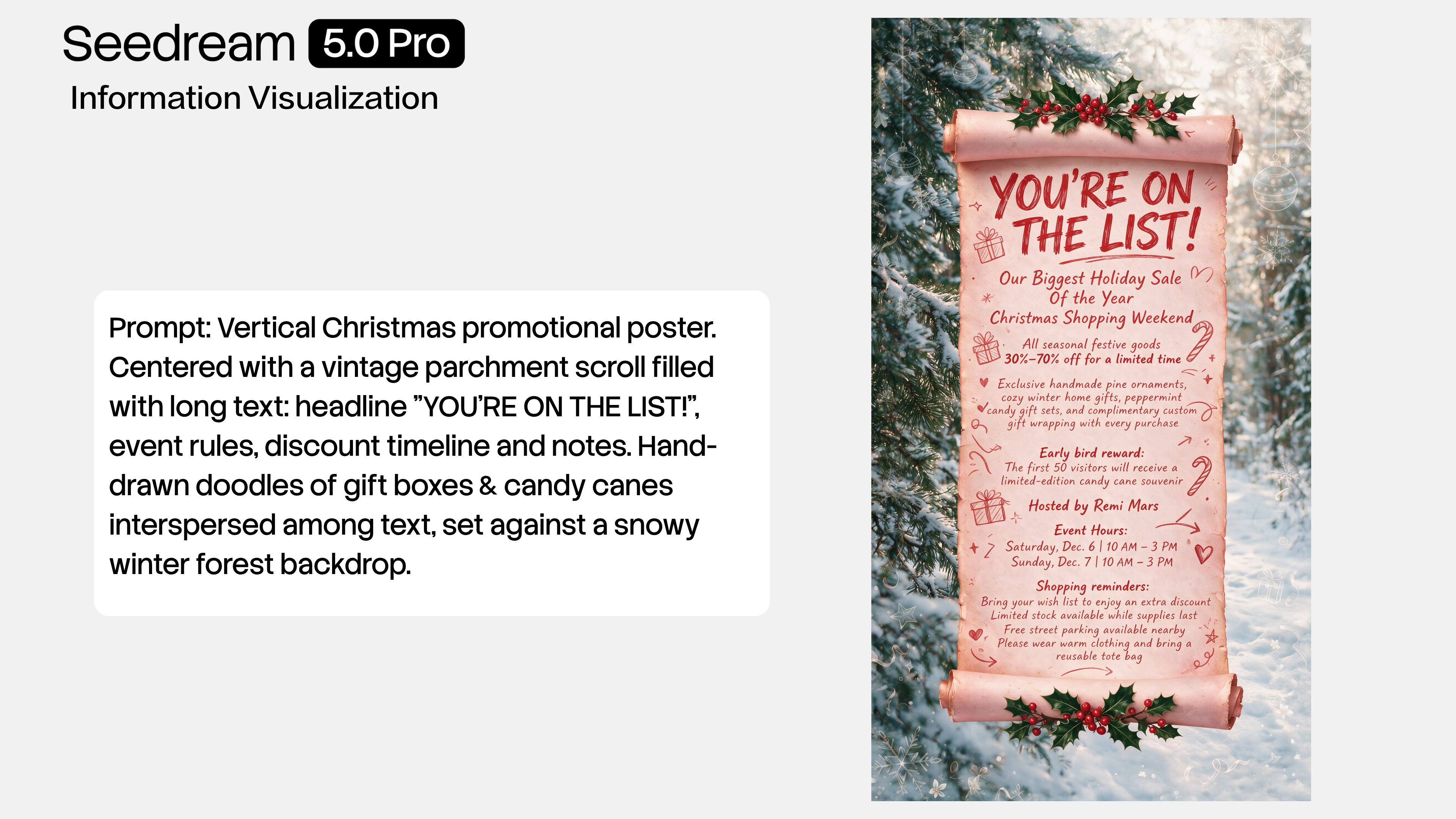 Seedream 5.0 Pro winter sale poster with an English headline, discount details, and event dates
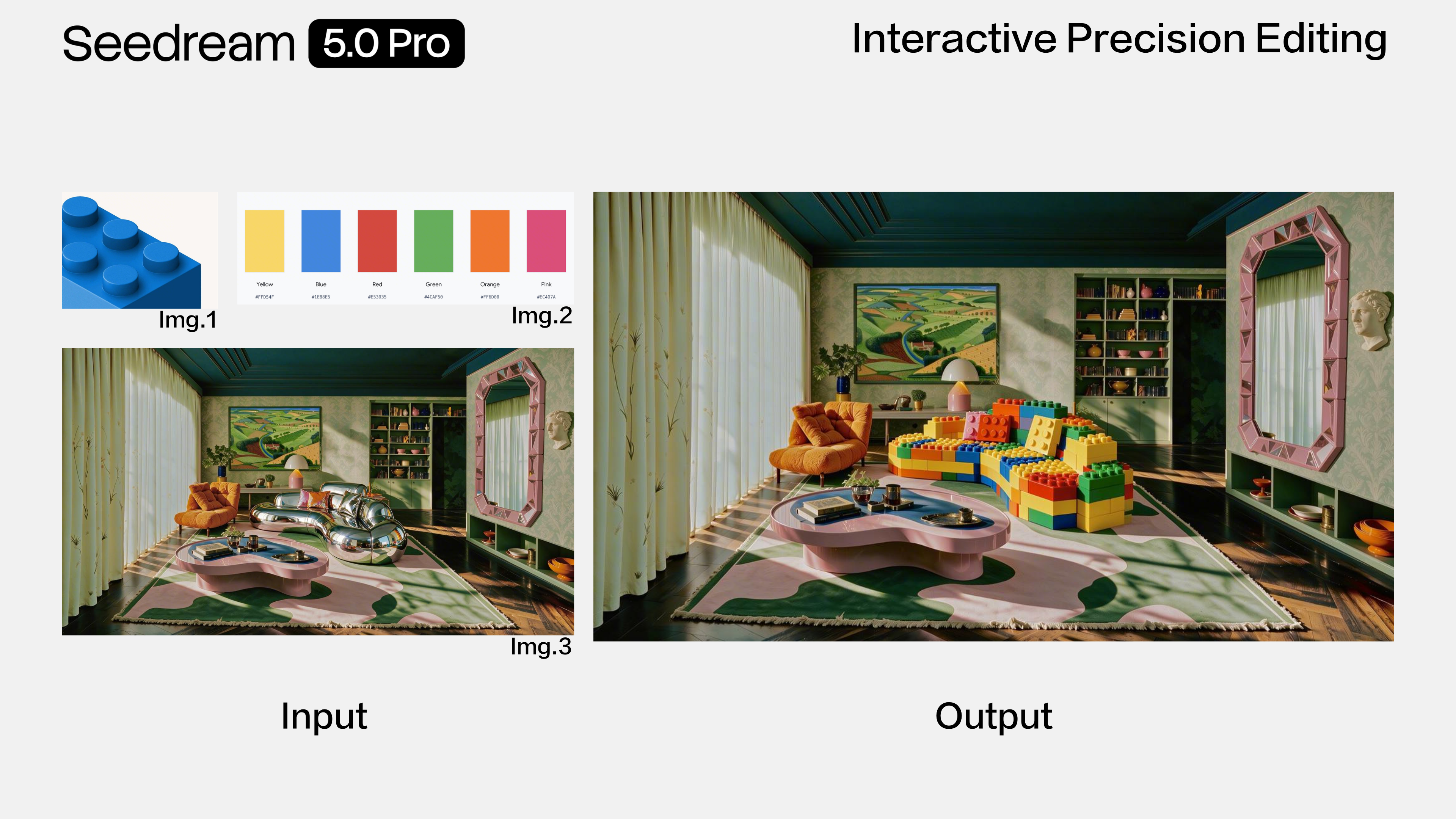 Seedream 5.0 Pro sofa edit guided by a material reference and a color swatch
ByteDance Seed demo | Input | What to check |
|---|---|---|
Winter sale poster | A brief with a headline, discount terms, and event dates | Check the spelling, dates, and visual hierarchy. Make sure the details are easy to read at the intended display size. |
Sofa color and material edit | A base room image, a material reference, and a color swatch | Compare the edited upholstery with both references. Check the sofa's shape, perspective, and lighting against the base image. |
ByteDance Seed published both images in the model announcement. The OpenAny quickstart below uses a separate poster prompt you can copy and adapt. ByteDance Seed release notes and examples
Choose an input mode and output size
Setting | OpenAny route |
|---|---|
Text to image | Describe the subject, composition, and exact text you want rendered. |
Image to image | Supply 1–10 publicly accessible HTTPS image URLs with the |
|
|
|
|
| Optional exact pixel dimensions from the supported list. For example, |
| One output per request. Submit separate requests for variations. |
Use text-to-image to try a new layout. For an edit, give each reference a specific job, such as base image, material, or color. OpenAny route parameters
Quickstart
In the OpenAny Playground, select Text to image. This example drafts a portrait poster for a ceramics studio with three lines of copy. To use the API, send a POST request to https://api.openany.si/v1/images with Authorization: Bearer $OPENANY_API_KEY and Content-Type: application/json.
{
  "model": "seedream-5.0-pro",
  "route": { "provider": "yir" },
  "route_mode": "balanced",
  "input": {
    "type": "text",
    "prompt": "Design a portrait poster for a ceramics studio sale. Use a warm ivory background, a photograph of a cobalt ceramic bowl in the center, and generous margins. Place the exact headline 'STUDIO SALE' at the top, '20% OFF CERAMICS' beneath the bowl, and 'SATURDAY ONLY' in a small footer. Use dark navy type and keep all three lines readable. Do not add other lettering or logos."
  },
  "parameters": {
    "resolution": "1K",
    "aspect_ratio": "3:4",
    "n": 1
  }
}
Poll GET /v1/images/{task_id} using the returned task ID. When the task succeeds, retrieve the file URL from result.files. Before publishing the poster, compare all three lines against the prompt and check the spacing around the product.
Edit a reference image
In Image to image, use the same endpoint and replace the request's input with the object below. Replace the sample URL with your own publicly accessible HTTPS image. A prompt that names both the change and the details to preserve gives you a concrete way to assess the result.
{
  "type": "image",
  "prompt": "Recolor only the sofa upholstery to muted olive green. Preserve the sofa shape, fabric texture, seams, room lighting, and camera angle. Keep the surrounding furniture unchanged.",
  "references": [
    {
      "role": "reference_image",
      "url": "https://example.com/your-room-photo.jpg"
    }
  ]
}
ByteDance's demo also shows interactive region selection and layer separation. The OpenAny request covered here uses a text prompt and reference image URLs. ByteDance Seed editing examples · OpenAny API and pricing
Playground
Parameters are derived from this model's official contract. No live request has been made.
Output settings
Result preview
yir · 316ms
This example shows the response structure. Generated images appear here after the run completes.
{
  "id": "string",
  "urls": {
    "get": "string",
    "cancel": "string"
  },
  "error": {
    "code": "YIR_INVALID_REQUEST",
    "action": "fix_request",
    "details": [
      {
        "field": "string",
        "reason": "invalid_body",
        "allowed": [
          "string"
        ],
        "expected": "string"
      }
    ],
    "message": "string",
    "retryable": true,
    "provider_error": {
      "message": "string",
      "provider": "string"
    }
  },
  "model": "string",
  "usage": {
    "outputs": 0
  },
  "object": "job",
  "result": {
    "files": [
      {
        "url": "http://example.com",
        "width": 0,
        "height": 0,
        "fidelity": {
          "grade": "original",
          "reason": "string"
        },
        "expires_at": 1,
        "media_type": "string",
        "duration_ms": 1
      }
    ],
    "warnings": [
      "additional_results_unavailable"
    ],
    "availability": "available",
    "content_safety": {
      "status": "passed",
      "checked_by": "provider"
    }
  },
  "status": "queued",
  "billing": {
    "status": "pending",
    "currency": "USD",
    "max_cost": "string",
    "gateway_fee": {
      "amount": "string",
      "status": "settled"
    },
    "billing_mode": "actual",
    "compute_charges": [
      {
        "usage": [
          {
            "unit": "string",
            "metric": "string",
            "quantity": "string"
          }
        ],
        "amount": "string",
        "status": "settled",
        "billed_by": "yir",
        "supply_type": "managed",
        "amount_basis": "yir_price_rule"
      }
    ],
    "official_comparison": {
      "source_url": "http://example.com",
      "savings_amount": "string",
      "baseline_amount": "string"
    },
    "total_charged_by_yir": "string"
  },
  "created_at": 1,
  "parameters": {
    "n": 1,
    "fps": 1,
    "size": "string",
    "voice": "string",
    "quality": "string",
    "duration": 1,
    "resolution": "string",
    "aspect_ratio": "string",
    "instrumental": true,
    "generate_audio": true,
    "lyrics_optimizer": true
  },
  "cancellation": {
    "effect": "stop_future_attempts",
    "status": "cancelled",
    "requested_at": 1
  },
  "completed_at": 1,
  "final_provider": "string",
  "parameter_notices": [
    {
      "name": "string",
      "reason": "channel_parameter_unsupported",
      "message": "string",
      "disposition": "ignored"
    }
  ]
}Agent handoff preview
Providers
| Provider | Pricing | Latency | Uptime | Supply | Route |
|---|---|---|---|---|---|
Live | Input $0.029 / image | 316ms | — | Verified |
| Image specification | Unit price |
|---|---|
| 1:1 · 1K | $0.029 |
| 1:1 · 2K | $0.059 |
Source: the selected provider route in OpenAny's public model catalog. A price update timestamp is not supplied.
API
- Base URL
https://api.openany.si/v1- POST
/v1/images- GET
/v1/images/{task_id}- Authentication
Authorization: Bearer $OPENANY_API_KEY
Request parameters
| Parameter | Type / range | Default value | Required | Description |
|---|---|---|---|---|
prompt | string | A watercolor fox reading a map in a pine forest | Yes | Prompt |
resolution | string · 1K | 2K | 1K | No | Output resolution. |
aspect_ratio | string · 1:1 | 4:3 | 3:4 | 16:9 | 9:16 | 2:3 | 3:2 | 21:9 | 1:1 | No | Output aspect ratio. |
size | string · 1024x1024 | 1152x864 | 864x1152 | 1424x800 | 800x1424 | 1248x832 | 832x1248 | 1568x672 | 2048x2048 | 2368x1776 | 1776x2368 | 2816x1584 | 1584x2816 | 2496x1664 | 1664x2496 | 3136x1344 | — | No | Exact output pixels; only explicitly compatible supplies are eligible. Conflicting resolution/aspect ratio is rejected. |
n | integer · 1 1 ~ 1 | 1 | No | Number of outputs from one API request (one Job), not the application batch size. For multiple Jobs, submit separate requests; n=1 does not prevent application-managed batching. |
Request example
curl 'https://api.openany.si/v1/images' \
  -H "Authorization: Bearer $OPENANY_API_KEY" \
  -H "Content-Type: application/json" \
  -d '{
  "input": {
    "prompt": "A watercolor fox reading a map in a pine forest",
    "type": "text"
  },
  "model": "seedream-5.0-pro",
  "parameters": {
    "aspect_ratio": "1:1",
    "n": 1,
    "resolution": "1K"
  },
  "route_mode": "balanced"
}'
Response example
Official schema example with placeholders, not a live response
{
  "id": "string",
  "urls": {
    "get": "string",
    "cancel": "string"
  },
  "error": {
    "code": "YIR_INVALID_REQUEST",
    "action": "fix_request",
    "details": [
      {
        "field": "string",
        "reason": "invalid_body",
        "allowed": [
          "string"
        ],
        "expected": "string"
      }
    ],
    "message": "string",
    "retryable": true,
    "provider_error": {
      "message": "string",
      "provider": "string"
    }
  },
  "model": "string",
  "usage": {
    "outputs": 0
  },
  "object": "job",
  "result": {
    "files": [
      {
        "url": "http://example.com",
        "width": 0,
        "height": 0,
        "fidelity": {
          "grade": "original",
          "reason": "string"
        },
        "expires_at": 1,
        "media_type": "string",
        "duration_ms": 1
      }
    ],
    "warnings": [
      "additional_results_unavailable"
    ],
    "availability": "available",
    "content_safety": {
      "status": "passed",
      "checked_by": "provider"
    }
  },
  "status": "queued",
  "billing": {
    "status": "pending",
    "currency": "USD",
    "max_cost": "string",
    "gateway_fee": {
      "amount": "string",
      "status": "settled"
    },
    "billing_mode": "actual",
    "compute_charges": [
      {
        "usage": [
          {
            "unit": "string",
            "metric": "string",
            "quantity": "string"
          }
        ],
        "amount": "string",
        "status": "settled",
        "billed_by": "yir",
        "supply_type": "managed",
        "amount_basis": "yir_price_rule"
      }
    ],
    "official_comparison": {
      "source_url": "http://example.com",
      "savings_amount": "string",
      "baseline_amount": "string"
    },
    "total_charged_by_yir": "string"
  },
  "created_at": 1,
  "parameters": {
    "n": 1,
    "fps": 1,
    "size": "string",
    "voice": "string",
    "quality": "string",
    "duration": 1,
    "resolution": "string",
    "aspect_ratio": "string",
    "instrumental": true,
    "generate_audio": true,
    "lyrics_optimizer": true
  },
  "cancellation": {
    "effect": "stop_future_attempts",
    "status": "cancelled",
    "requested_at": 1
  },
  "completed_at": 1,
  "final_provider": "string",
  "parameter_notices": [
    {
      "name": "string",
      "reason": "channel_parameter_unsupported",
      "message": "string",
      "disposition": "ignored"
    }
  ]
}
Error handling
400Check the model ID and request fields.429Retry with exponential backoff.5xxRetry only temporary provider failures.Examples
Request example
POST /v1/imagescurl 'https://api.openany.si/v1/images' \
-H "Authorization: Bearer $OPENANY_API_KEY" \
-H "Content-Type: application/json" \
-d '{
"input": {
"prompt": "A watercolor fox reading a map in a pine forest",
"type": "text"
},
"model": "seedream-5.0-pro",
"parameters": {
"aspect_ratio": "1:1",
"n": 1,
"resolution": "1K"
},
"route_mode": "balanced"
}'